Search Results:
Search Results:
Search Results:
Search Results:
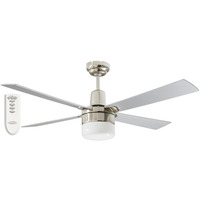
Find the best ceiling fan remotes here at Sparky Direct [ Read More ]
A ceiling fan remote system consists of two integrated components working in coordination. The handheld transmitter sends an encoded wireless signal to a dedicated radio-frequency channel. A small receiver module, wired in-line between the ceiling rose and the fan motor, decodes that signal and switches power to the motor and light load accordingly. The wall switch remains live throughout operation and supplies continuous power to the receiver module.
A remote replaces the mechanical pull chain or rotary wall control. Most units handle three or more fan speeds, light on and off, light dimming where supported, a sleep timer, and motor reversal for summer and winter airflow. On ceiling fans supplied with a remote, the receiver is usually pre-paired at the factory.
Radio frequency (RF) remotes transmit on bands such as 433 MHz or 2.4 GHz. The signal passes through walls, ceilings, and furniture without significant attenuation, so the remote does not need a line of sight to the receiver. Infrared (IR) remotes use a modulated light beam, which requires a clear optical path between the transmitter and the receiver sensor. RF is the established standard for ceiling fans because the receiver is enclosed inside the canopy assembly, placing it well outside the effective range of infrared transmission.
The receiver contains a radio module, a microcontroller, and relays or a dimming circuit. When the remote sends a command, the receiver matches the code to its paired address and switches the appropriate output. Fan outputs use triac or capacitor switching for speed control on AC motors, or pulse-width signals to the onboard driver on DC motors.
RF remains the dominant ceiling fan remote technology across Australian residential and commercial installations. Low-power 433 MHz units are common on entry-level and mid-range universal kits. Newer smart models use 2.4 GHz Wi-Fi or Zigbee protocols, which enables application-based control and integration with smart home platforms. RF remotes pair to a compatible receiver using either a DIP switch address configuration or a press-and-hold learning sequence initiated at power-up.
Infrared systems require the user to point the remote at a receiver window. On ceiling fans this is impractical because the receiver is enclosed in the canopy. IR is reserved for wall-mounted fan controllers and some older fan-light combinations where the sensor is visible from floor level.
A universal kit, such as the MARTEC MPREMS slimline or the Mercator FRM87, includes a receiver module that fits inside most standard fan canopies. These kits work with three-speed AC fans and some non-dimmable light kits. Always confirm motor type and wattage ratings before specifying a universal kit.
A fan supplied with a brand remote, such as the Brilliant 99222 or the Clipsal ACESR16K1 kit for 3HS and 4HS airflow fans, is pre-configured. The receiver code is fixed or learned through a pairing sequence. Brand-matched systems reduce the risk of signal conflicts in multi-fan installations.
Compatibility is the most common point of failure when replacing a remote. A mismatch in motor type, frequency, or receiver rating will either prevent pairing or damage the fan motor. Check every specification before ordering a replacement from the Ceiling Fan Remotes category.
AC ceiling fans use capacitor-based or triac speed-switching circuitry built into the receiver. The remote receiver steps incrementally between a fixed number of preset operational speeds. DC ceiling fans use an onboard electronic driver that accepts low-voltage control commands, typically transmitted over a dedicated four-wire connection between the receiver and the motor. A remote specifically designed for an AC fan installation will not successfully drive a DC motor, and the reverse configuration applies equally. Always match the remote specification to the exact motor type before purchasing replacement equipment.
| Factor | Universal Kit | Brand-Matched |
|---|---|---|
| Fits | Most AC fans, some DC | Specific model only |
| Pairing | Manual code or learn | Pre-paired or single-step |
| Light dimming | Often non-dimmable | Full feature support |
| Warranty | Kit only | Often covers fan too |
| Best use | Replacing a lost remote | New fan install |
When two fans on the same frequency are installed within signal range, pressing one remote can trigger both. Multi-fan installations require either different DIP switch addresses on each receiver or a 16-channel kit such as the CLIPSAL ACESR16K1, which lets each remote address its own fan.
Before mounting any receivers, pair each remote to its receiver on the bench. Label each handset and receiver with the room name. This avoids stripping the canopy back off later to reset addresses.
AC remote kits almost universally offer three operational speeds: high, medium, and low. DC fans commonly support six distinct speeds, and some premium models deliver eight or more incremental settings. Multi-speed DC control provides finer airflow adjustment and significantly quieter low-speed operation, which suits bedrooms, home offices, and any environment where acoustic comfort is a priority.
A remote can switch a fan light on or off, and many models also dim it. Dimming only works with dimmable LED drivers or compatible incandescent loads. Non-dimmable LED lights fitted to a dimming remote will flicker or fail early. Check the light kit rating before selecting a dimming remote.
Most remotes offer configurable timer intervals of 1-hour, 2-hour, 4-hour, and 8-hour durations. A dedicated sleep function progressively steps the fan speed downward overnight to prevent the occupant waking from cold. Timer commands are retained in the receiver memory after transmission, so the remote handset can leave the room once the timer value is established.
In summer, the fan blows air downward to create a cooling wind chill effect. In winter, reversing the motor pushes warm ceiling air back down along the walls, which reduces heating costs in high-ceiling rooms. The reverse control may be on the remote, on the receiver, or on the fan canopy depending on the model.
Smart remotes bridge the gap between handheld control and whole-home automation. The Mercator Ikuu FRM86G, for example, replaces the standard RF receiver with a Wi-Fi module that connects to the Ikuu app.
Wi-Fi receiver modules join the home wireless network just like any other compatible smart device. No dedicated hub is typically required for basic model operation. The associated application exposes fan speed adjustment, rotational direction, illumination level, and timer functions from anywhere with an active internet connection.
Most smart fan receivers support Google Home and Amazon Alexa. HomeKit support is less common and usually requires a hub. Voice control covers basic commands such as "turn fan to medium" or "dim ceiling fan light to 50 percent". Scenes can include fans alongside lights, blinds, and air conditioning.
Scheduling lets the fan start before the user arrives home, or shut off automatically at a set time. Geofencing rules trigger fans to run based on phone location. Group controls run all fans in a zone from a single command, which is useful for open-plan living areas.
Start with the fan specification plate, which provides the essential technical parameters for compatibility assessment. Note the motor type (AC or DC), the rated electrical load expressed in watts, and the existing receiver model identifier if the fan already has wireless control fitted. A replacement remote must meet or exceed the motor wattage rating and match the motor type exactly. A 60W fan installation paired with a 100W-rated receiver is acceptable, but a 100W fan connected to a 60W-rated receiver will fail prematurely through thermal overload.
Larger rooms or rooms with heavy furniture benefit from RF range of at least 20 m. Outdoor and alfresco fans usually sit further from the control position, so check the range specification. For bedrooms, prioritise quiet operation and a sleep timer over multi-speed granularity.
Confirm whether the fan light is dimmable, and whether the LED driver supports trailing-edge or leading-edge dimming. A dimming remote driving a non-dimmable light kit will cause flicker and premature driver failure. Non-dimmable remotes such as the MERCATOR FRM87 remove that risk where dimming is not needed.
Published RF range assumes open air. Internal walls, metal roofing, and nearby Wi-Fi routers all reduce real-world range. For two-storey homes or remote outdoor areas, specify a receiver rated for at least 30 m. Repeaters are not commonly available for ceiling fan remotes, so range must be adequate at install.
A standard kit includes the handheld remote, a receiver module, a wall-mount bracket or holder for the remote, mounting screws, and a printed wiring diagram. Some kits include a coin cell battery for the remote; many do not.
The receiver module sits between the active supply conductor and the fan motor inputs. The terminal block accepts live, neutral, and earth conductors on the input side, and delivers switched fan and light outputs on the load side. The receiver must fit inside the fan canopy housing or mounting plate cavity, so physical dimensions are a genuine constraint on some slim-profile fan models. All wiring and terminations must comply with Standards Australia AS/NZS 3000:2018.
Retrofitting a remote kit to an existing fan requires dropping the canopy, disconnecting the pull-chain or rotary control wiring, and terminating the receiver in its place. New installations are simpler because the receiver can be fitted before the fan goes up. Either way, isolate the circuit at the switchboard before starting work.
Under Australian electrical law, any work on fixed wiring above extra-low voltage must be performed by a licensed electrical contractor. This includes connecting a ceiling fan remote receiver to mains wiring. DIY installation is not permitted and will void both the fan warranty and household insurance.
Compliance reminder: Ceiling fan remote receivers sit on mains voltage. Installation must be carried out by a licensed electrician and comply with AS/NZS 3000:2018. An electrical safety certificate should be issued for the work.
When a remote is lost or physically damaged, the first step is identifying the installed receiver model. The receiver specification label is usually visible inside the fan canopy after removing the cover plate. If the original brand still manufactures a matched replacement handset, that is the simplest remediation. If the existing receiver is obsolete or unsupported, a universal kit replaces both the receiver and the remote handset together as a matched pair.
Many older ceiling fans use a pull-chain for speed control and a second chain for the light. A universal remote kit replaces both chains with wireless control. The receiver bypasses the chain switches entirely, so the chains can be removed or left in place as a manual override.
If the motor is noisy, the bearings are worn, or the blades wobble, a remote upgrade will not fix those issues. A faulty motor, non-repairable wiring, or a fan older than 15 years is usually more economical to replace than to retrofit. New fan options across AC and DC ranges deliver better airflow per watt than most older units.
Budget universal kits with basic functionality start around $50 to $80. Mid-range kits incorporating dimming capability, timer functions, and motor reversal sit in the $90 to $150 price band. Smart Wi-Fi enabled kits from Mercator Ikuu and comparable manufacturers run from $120 to $250. The price differential reflects variations in receiver build quality, relay current ratings, and overall feature depth.
For a straight replacement on a three-speed AC fan, a non-dimmable universal kit delivers the most value. The MARTEC MPREMS slimline fits most canopies and drives standard AC fans without fuss. For fans with dimmable LED lights, step up to a dimmable universal or a brand-matched kit.
A $70 universal kit plus $150 in electrician labour lands at about $220 installed. A premium smart kit at $200 plus labour reaches $350. The smart kit pays back over time on fans used daily because scheduling and geofencing reduce runtime. For holiday homes and infrequently used rooms, the budget kit is better value.
Sparky Direct stocks ceiling fan remotes from Brilliant Lighting, Martec, Mercator, Clipsal, Ventair, and Hunter Pacific. Buying from a specialist electrical wholesaler gives electricians access to trade pricing, compatible accessories, and correct technical data for each receiver.
Confirm that the receiver load rating meets or exceeds the total fan wattage consumption. Confirm that the receiver physically fits inside the available canopy clearance space. Check whether the remote supports dimming functionality and whether the installed light kit is compatible with dimmable operation. Review the frequency specification carefully if the installation site contains multiple ceiling fans or nearby RF devices that could cause interference.
Three data points matter: motor type (AC or DC), fan rated wattage, and light kit type. With those in hand, the category filter on Ceiling Fan Remotes narrows the choice quickly. Call the Sparky Direct trade desk if the receiver label is damaged or unreadable.
Most ceiling fan remotes use a CR2025 or CR2032 coin cell, or two AAA cells. Expect 12 to 24 months from a fresh set in typical use. Low battery symptoms include delayed response, intermittent commands, and reduced range. Replace batteries as a first step before blaming the receiver.
433 MHz remotes can be interfered with by garage door openers, weather stations, and some alarm sensors. 2.4 GHz smart remotes can drop signal in dense Wi-Fi environments. If a remote becomes unreliable after nearby equipment changes, frequency interference is the likely cause.
Receivers typically fail through either thermal stress or capacitor degradation. A fan operating continuously near its rated electrical load shortens receiver operational life considerably. Remote handsets generally outlast their paired receivers by several years in typical residential service. Keep the original handset model identifier noted in installation records, in case a matched replacement is required later.
Start systematically with a fresh battery installation. Re-check the DIP switch address configuration on both the remote handset and the receiver module, if the particular kit uses binary addressing. For learn-mode receivers, isolate the circuit at the switchboard for approximately one minute, restore power, and press the learn button within the manufacturer-specified pairing window. If pairing consistently fails despite correct procedure, the receiver may be electronically faulty and require replacement.
Check for new metal objects, such as a replaced roof or a new appliance, between the user and the receiver. Wi-Fi remotes can suffer when the router changes channel, so reboot the router and re-pair the receiver. If range has always been marginal, replace the receiver with a higher-range model rather than moving the fan.
If the fan works but the light does not, the light output on the receiver may be faulty, or the light kit driver has failed. Swap the light for a known-good unit to isolate the fault. If the fan runs only at one speed, the speed switch on the receiver is failing and the unit should be replaced.
If a receiver shows signs of heat damage, such as discolouration or a burnt smell, isolate the circuit immediately and replace the receiver. Do not attempt to reuse it. Heat-damaged receivers can fail short-circuit and may damage the fan motor.
Club Clipsal is Australia's largest electrician community offering trade rewards, business support, and exclusive benefits. When you nominate Sparky Direct as your preferred wholesaler, we automatically apply your Clipsal spend points to your Club Clipsal account daily.
Entry-level offering coaching, mentoring, and training discounts
Unlock exclusive industry tools and networking events
Access Toyota fleet offers and business software discounts
Maximum benefits, including VIP experiences and rewards
1. Sign Up: Create your Club Clipsal account at clipsal.com/club-clipsal or via the iCat mobile app
2. Nominate Sparky Direct: Select Sparky Direct from the wholesaler dropdown menu in your profile
3. Add Email: Enter your Sparky Direct account email address in the membership number field
4. Start Earning: Every dollar spent on Clipsal products earns points automatically
Redeem points from the rewards store, including gift cards, tools, and experiences. Access business summits, product training, and industry networking events. Receive early access to new product launches and special promotions. Connect with fellow electricians via the Club Clipsal community app.
Specifiers and installers working on ceiling fan projects often need parts beyond the remote. Browse Ceiling Fan Lights for replacement light kits, Ceiling Fan Switches for hard-wired wall controls, Ceiling Fan Drop Rods for high-ceiling mounting, and Fan Speed Controllers for wall-mounted options. The Clipsal Iconic Fan Controllers range covers modern plate-style controls, and the Airflow Ceiling Fan range pairs neatly with matched remote kits.
For electricians sizing up full fan replacements, Ventair DC ranges and CLA low-profile fans both include remote options as standard.
Watch Mercator Ikuu FRM86G | Smart Universal Ceiling Fan RF Remote Control | Wi-Fi video
Watch CLIPSAL ACESR16K1 | 16 Channel RF Remote Control Kit to suit Clipsal 3HS / 4HS Series Ceiling Fans video
Watch MERCATOR FRM87 | Ceiling Fan Remote Control Non Dimmable video

Cant beat a Clipsal fan. Heaps of airflow and not noisy at all. Nothing complex with setting up the remote either. Recommend to anyone who's looking to get a fan installed but doesn't want to modify the switch wiring at all. Good price too.
I purchased this about a month ago and it's been fantastic. The remote makes it easy to adjust brightness, fan speed, and colour settings, and it looks great in the room. It's also wonderfully quiet, which makes it perfect for the bedroom. Highly recommend if you're after a safe, compact fan that performs well.
Fan module was a direct swap with identical connectors. Simple plug and play. Remote is much easier to use as well.
Quality products in stock • Fast Australia-wide delivery • Competitive trade pricing
Browse Ceiling Fan Remotes → Get Expert Advice →Replacement remotes are often available, provided they are compatible with the fan.
Sparky Direct supplies ceiling fan remotes with fast Australian delivery to support convenient fan control solutions.
Yes, if wiring or receiver installation is required, a licensed electrician must complete the work.
Warranty coverage varies by manufacturer and typically applies to manufacturing defects.
Check fan compatibility, motor type, receiver requirements, and control functions.
Yes, many ceiling fan remotes are available as replacement or upgrade options.
Maintenance is minimal and usually limited to battery replacement.
Remotes operate silently, with only the fan motor producing sound.
Many remotes allow separate control of the fan and light.
Range and signal strength vary by model, but most work within typical room distances.
Yes, remote control allows adjustment without accessing wall switches.
Yes, they are commonly used in bedrooms for convenience and comfort.
Most handheld remotes use standard batteries, which require periodic replacement.
Ceiling fan remotes are used to control fan speed, direction, and lighting functions without using wall switches.
Yes, remotes allow convenient control from anywhere within range.
Most remotes are designed with simple buttons for everyday operation.
Installation involving wiring or receivers must be completed by a licensed electrician.
Some systems allow pairing with multiple fans, depending on model and configuration.
Yes, they typically use radio frequency signals for wireless operation.
Yes, a compatible receiver is required and is either built into the fan or installed in the canopy.
In many cases, remotes can replace or supplement wall controls, depending on fan design.
Yes, but AC and DC fans often require different, model-specific remotes.
Many remotes control fan speed, on/off operation, light on/off, dimming, and reverse function depending on the fan.
Ceiling fan remotes supplied in Australia should comply with relevant AS/NZS electrical and radio communication requirements.
Compatibility depends on the fan model, motor type, and receiver, so manufacturer specifications should be checked.